From the counter to the kitchen, without the internet
Up24 Sale System Restaurant Edition takes the order, sends it to the kitchen screen, prints the receipt in English and Urdu, and tells you at closing which dishes made money.
Fast at the counter, clear in the kitchen, honest about the cash, and still running when the internet is not.
#01
Works with no internet
Billing, the kitchen screen, reports and backups all run on one Windows PC. Your data stays on that PC.
#02
Free for 10 days
Every feature, no card, no sign-up. Then a licence key.
#03
English and Urdu
Urdu names on the menu, and receipts and kitchen tickets in either language or both.
#04
Owner, manager, cashier
Each with a PIN. Cancels, refunds and big discounts need a manager.
#05
Daily backups
Automatic, checked, and copied to a USB or second drive if you choose one.
#06
Kitchen screen and token display
On a second screen, a TV, or a tablet on your Wi-Fi. Cooks see what to make; customers see when it is ready.
#07
Touch and keyboard
Big buttons for a touch screen, and shortcuts for a fast cashier.
#08
Bring your menu
Paste it from Excel or import a CSV, and add photos from a folder by name.
#09
Only what you use
A small dhaba switches off tables, riders and stock; a busy restaurant switches them on. Nothing is deleted.
#10
A demo restaurant inside
Try every screen with a sample menu and a week of orders before you enter your own.
Kitchen screen and token display
From the counter to the cook to the customer
Run the kitchen screen on a second monitor, a TV, or any tablet or phone on your Wi-Fi. It needs no internet and no extra software.
TOKEN 9 READY
Step 01→
Counter
The cashier takes the order. It gets a token, or a table number.
Step 02→
Kitchen
It appears on the kitchen screen at once. The cook taps Start, then Ready.
Step 03
Customer
The token moves to Ready on the display, with a chime. No shouting.
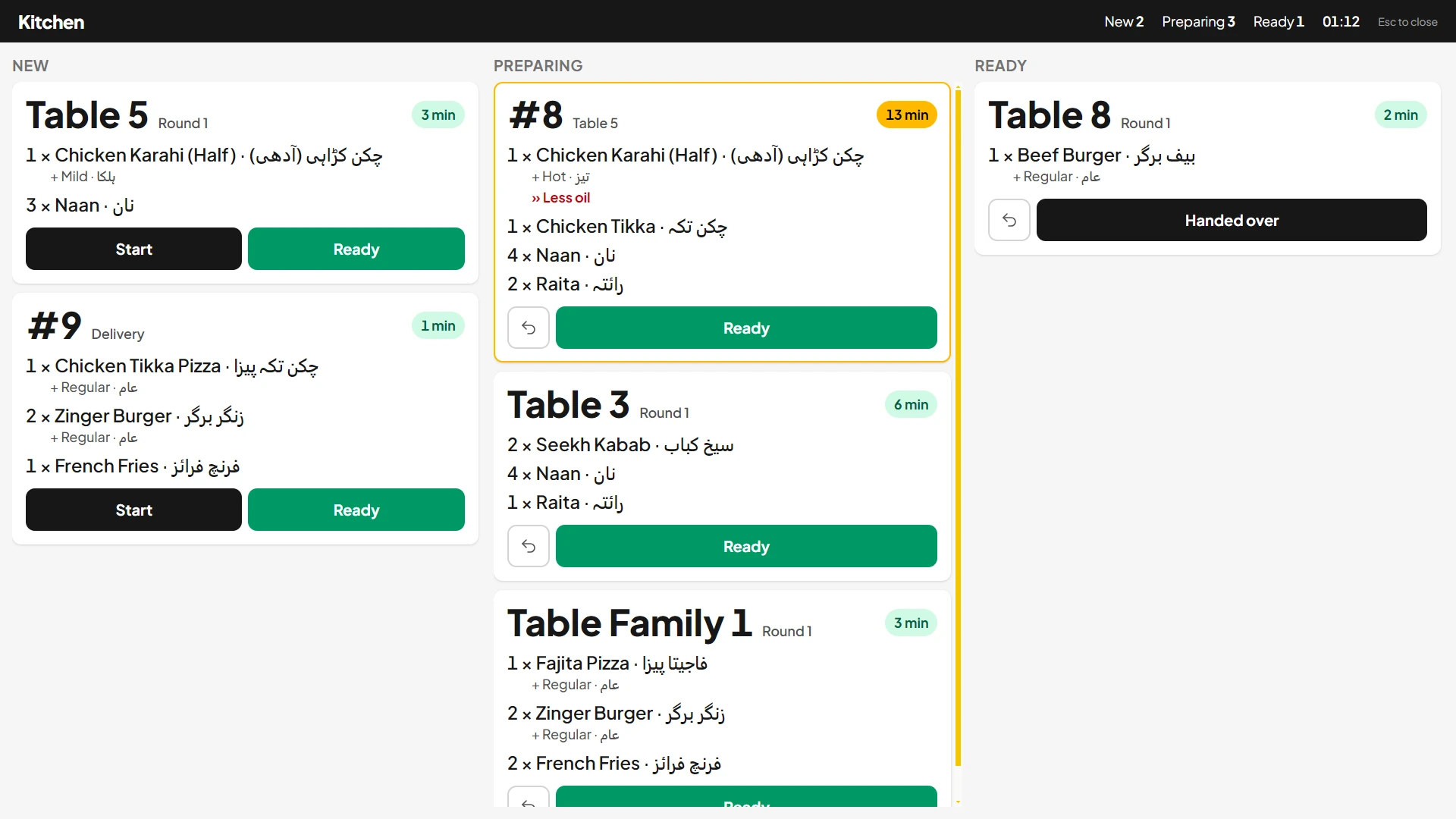
The kitchen screen: new orders, what is cooking and what is ready, with the minutes each one has waited.
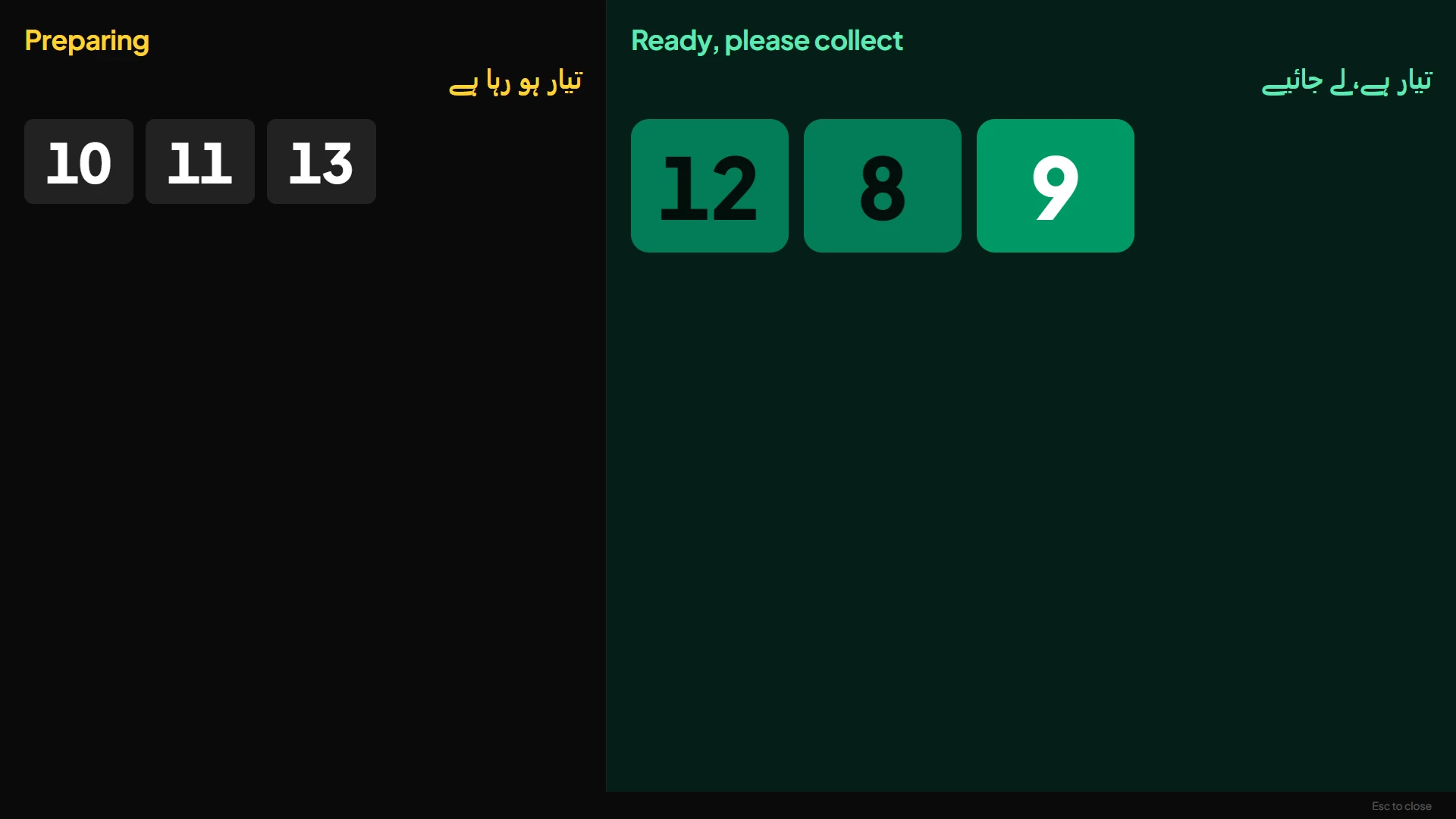
The token display for customers, in English and Urdu.
New, Preparing and Ready columns with big touch buttons
Options under each item and notes in red, so "less oil" is not missed, with the Urdu name beside the English
A token display for customers, with a chime when their food is ready
On a second monitor or TV, or on a tablet or phone over the restaurant's Wi-Fi (no internet)
Kitchen tickets per category: grills to one printer, pizza to another, drinks to none
Features
Everything a restaurant does in a day
Switch on only what your restaurant uses in Settings, Features. A small dhaba and a busy restaurant use the same app.
Order 01/09 · Billing
A counter that keeps up at rush hour
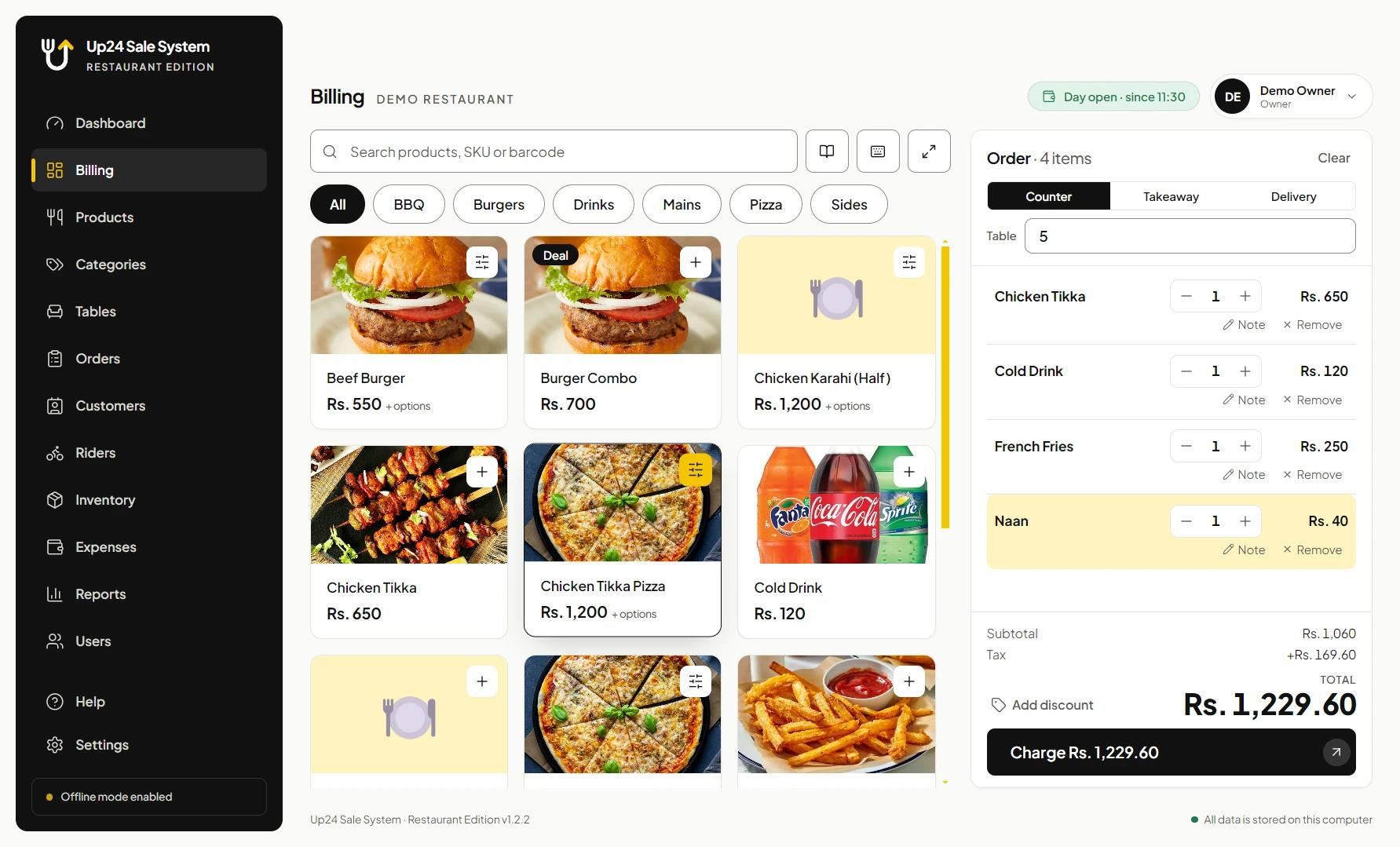
Tap the menu, choose the options, charge. Counter, takeaway and delivery on one screen.
Options and sizes on a dish (Mild or Hot, Regular or Large, extra cheese) and a note for the kitchen
Deals and combos at their own price
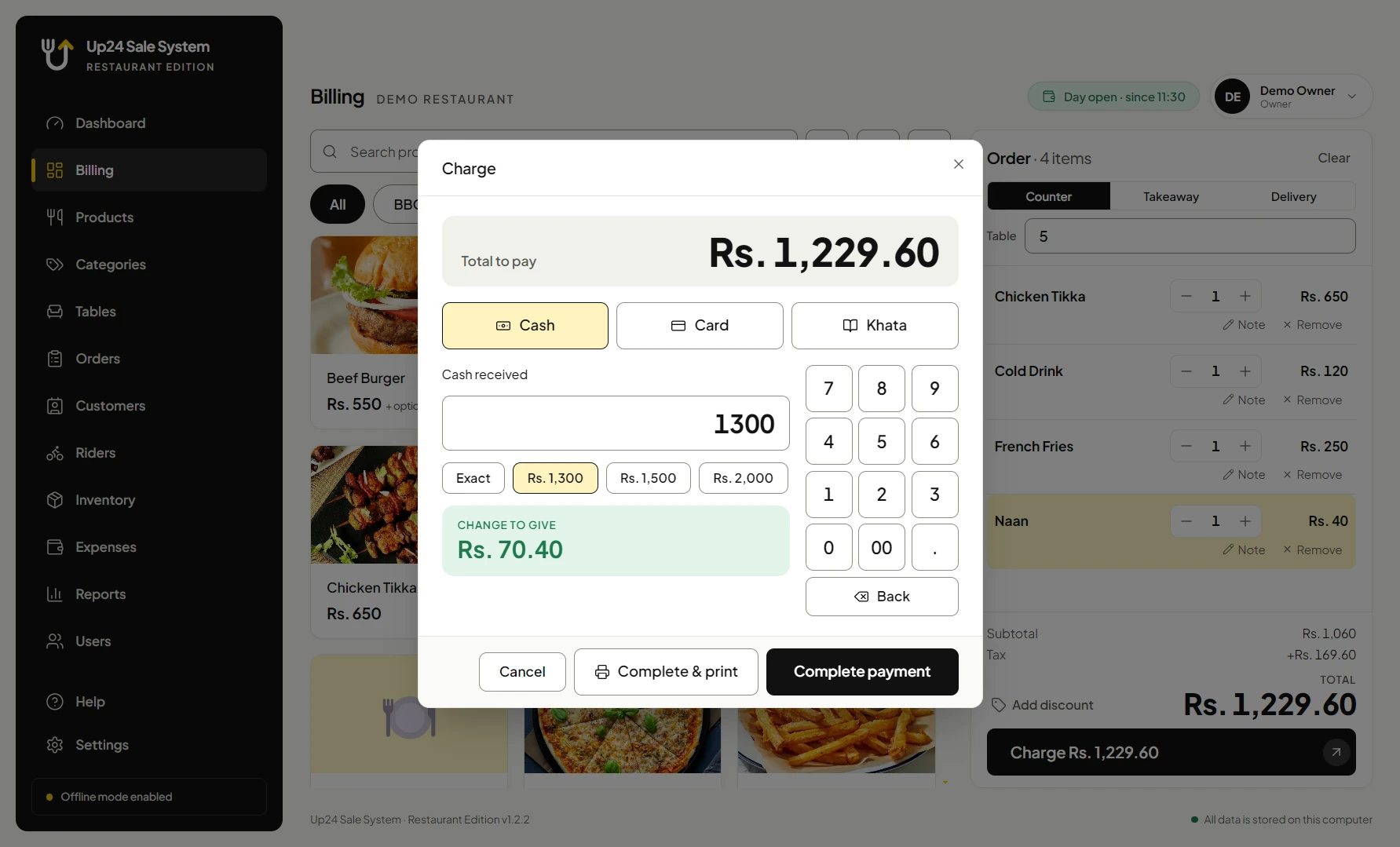
Cash with the change shown big, card, or khata for a regular customer
A discount in rupees or percent, with a limit for cashiers above which a manager's PIN is needed
Every order gets a daily token number; a table number is optional
Order 02/09 · Menu
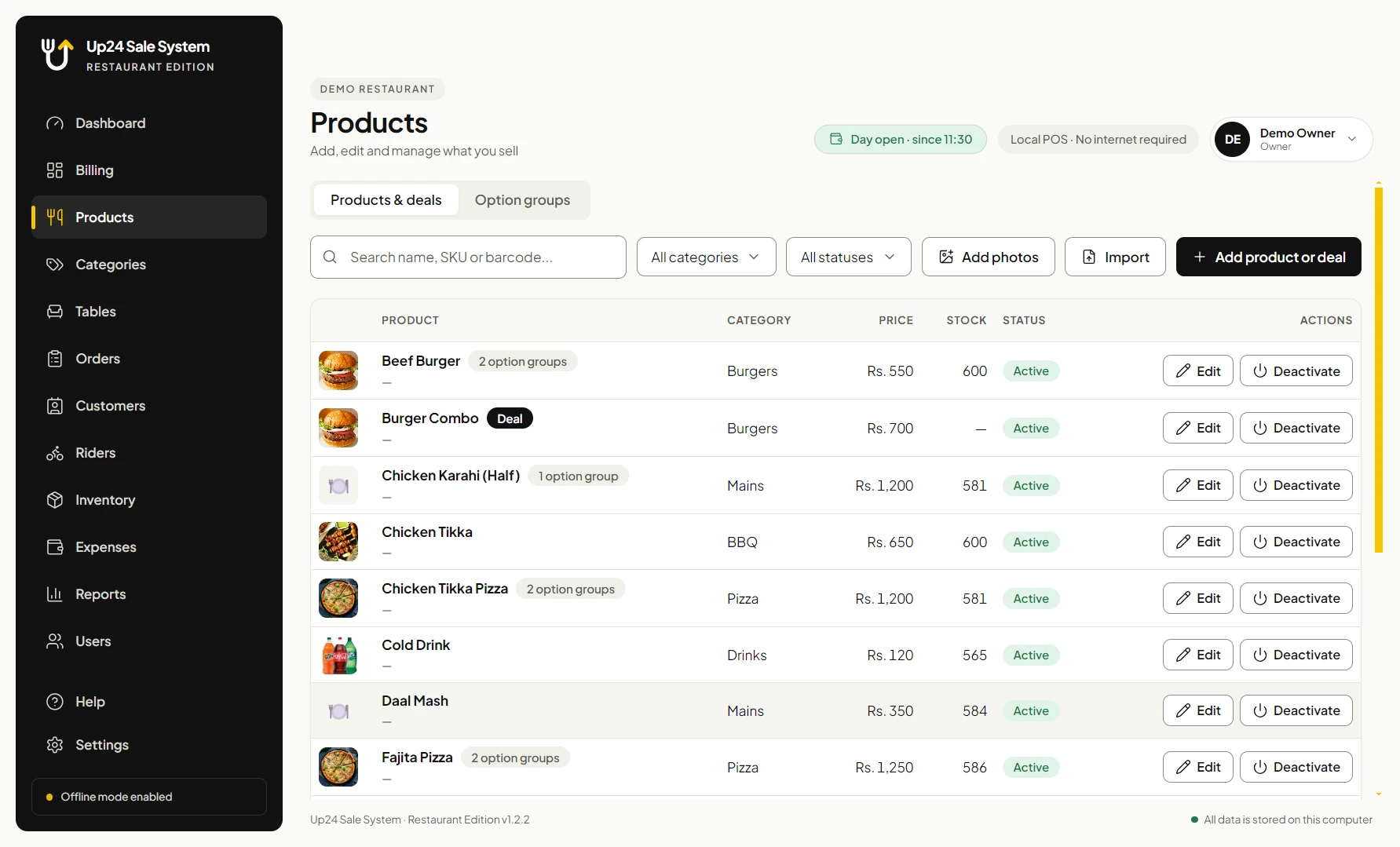
Your whole menu in, in an afternoon
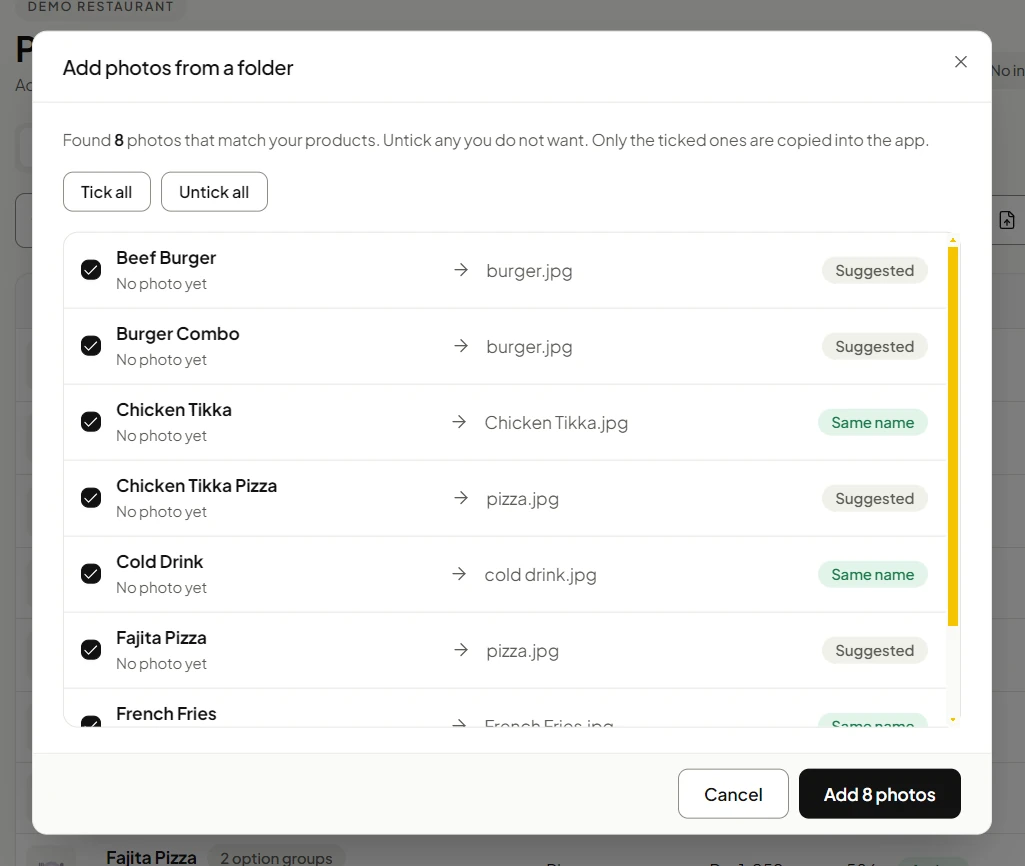
Bring the menu you already have, then add the photos in one go.
Paste the menu from Excel or import a CSV, with a preview of every row before anything is saved
Add photos from a folder: they are matched to dishes by name (burger.jpg goes to the burgers)
Option groups for sizes and extras, and deals made of other dishes
Urdu names beside the English, for the receipt and the kitchen
Take a dish off the menu without deleting it, so old orders stay as they were
Order 03/09 · Tables
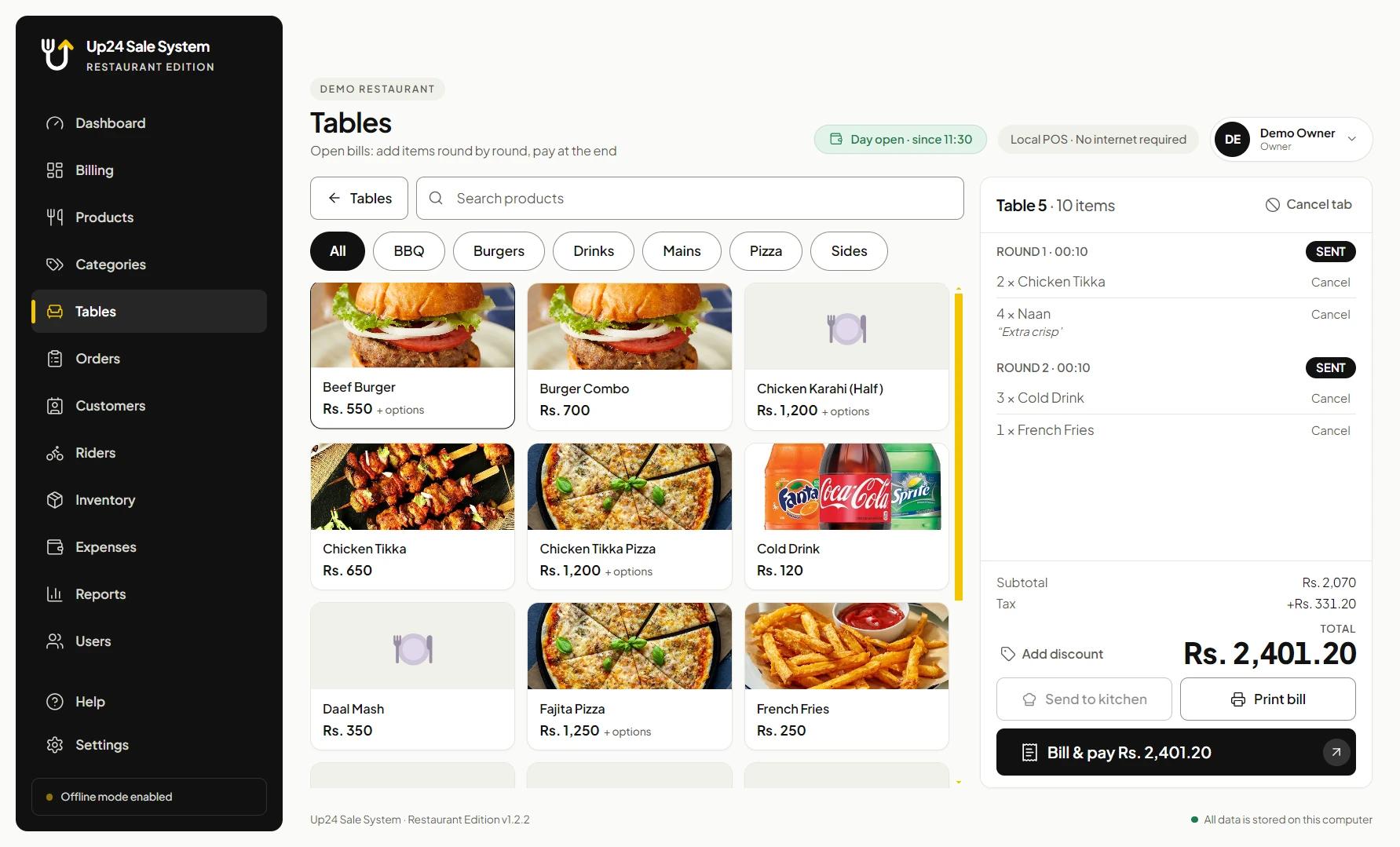
Table bills that grow round by round
Open a table, send what they ordered, add more later, and pay once at the end.
Each table shows its running total and how long it has been open
Send to kitchen sends only the new items, as Round 1, Round 2 and so on
Cancelling an item the kitchen already has needs a manager's PIN and a reason, and the kitchen is told
An open table is not a sale: it counts only when it is paid
Order 04/09 · Delivery
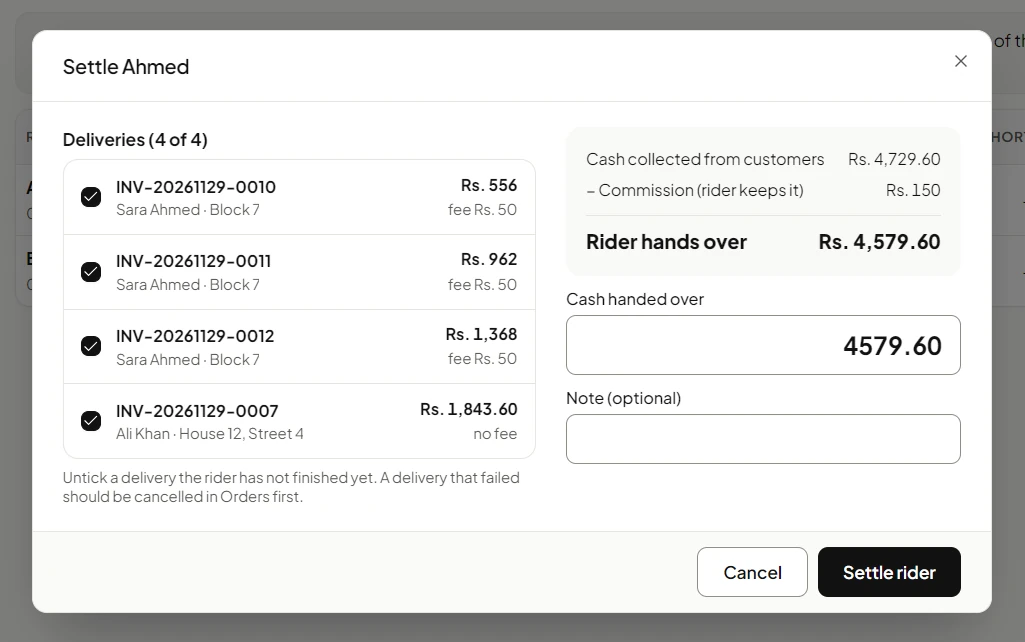
Delivery and riders, with the cash accounted for
Know which rider has whose money, and settle when they come back.
A regular customer is found by phone number, with their last address filled in
Pay on delivery: the order goes to the kitchen now and counts as a sale when paid
Rider commission per delivery or as a percentage of the delivery charge
Settle a rider: the cash they hand over goes into the drawer, and any shortage stays on their name
A printed settlement slip with a signature line
Order 05/09 · Khata
Khata for regular customers, with a limit
Let a regular take the order now and pay later, and always know who owes what.
A khata limit for each customer; above it, a cashier needs a manager's PIN
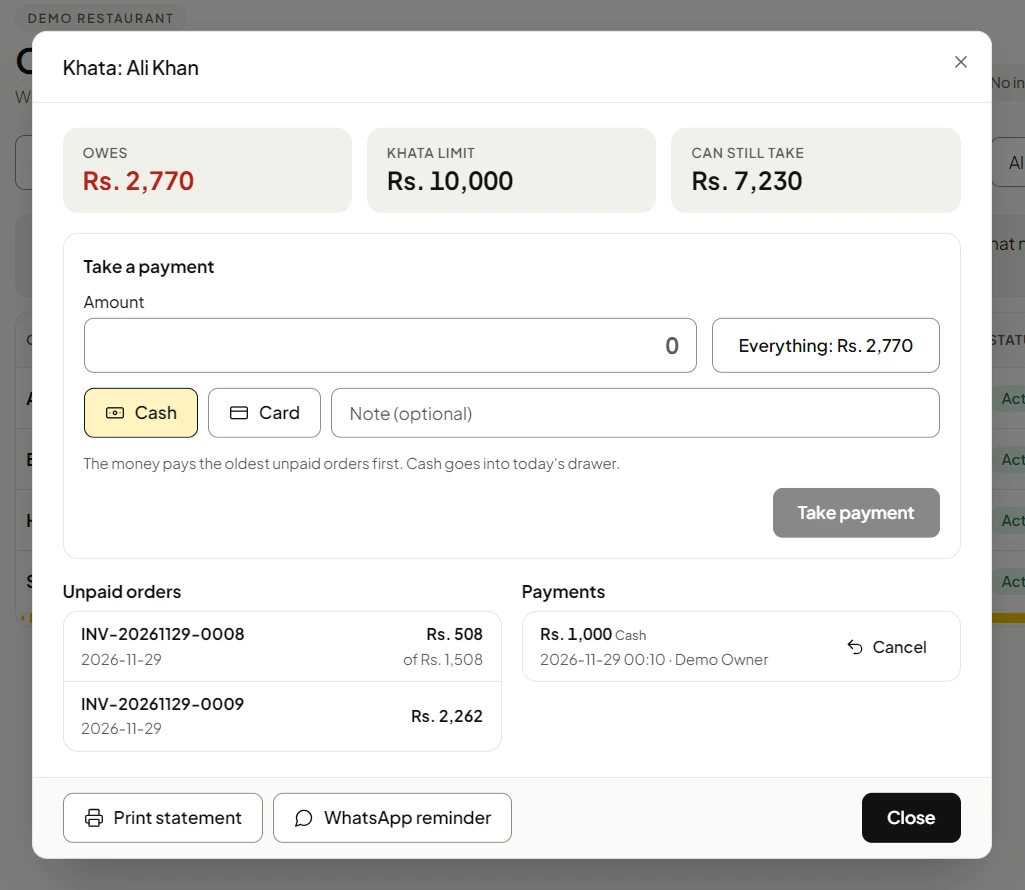
Take part or all of the money later: it pays the oldest orders first
Their account shows what is owed, every payment and how old the debt is (30, 60, 90 days)
Print a statement, or send a WhatsApp reminder from your own phone
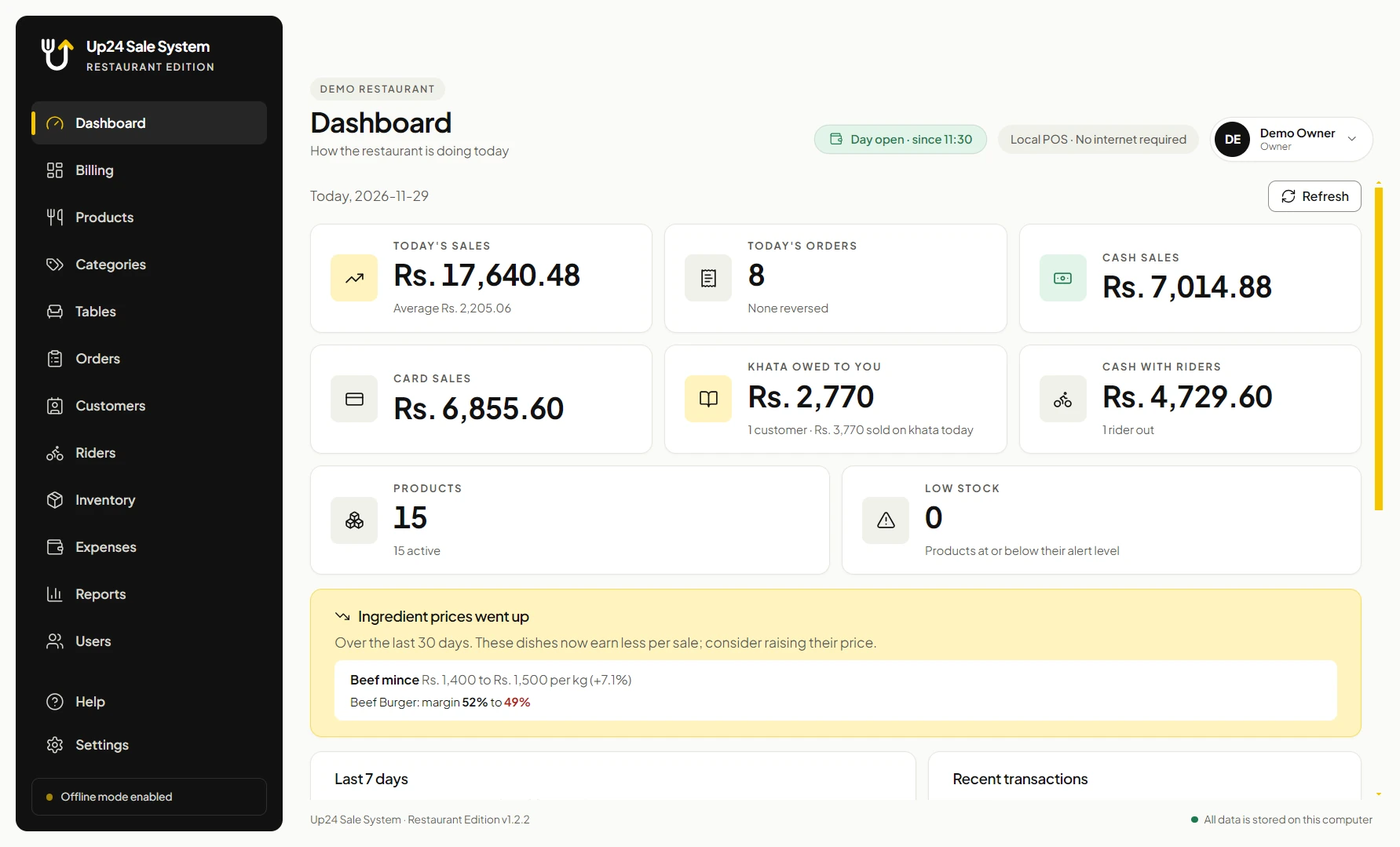
The dashboard shows the total khata owed to you
Order 06/09 · Urdu receipts
Receipts in English, Urdu or both
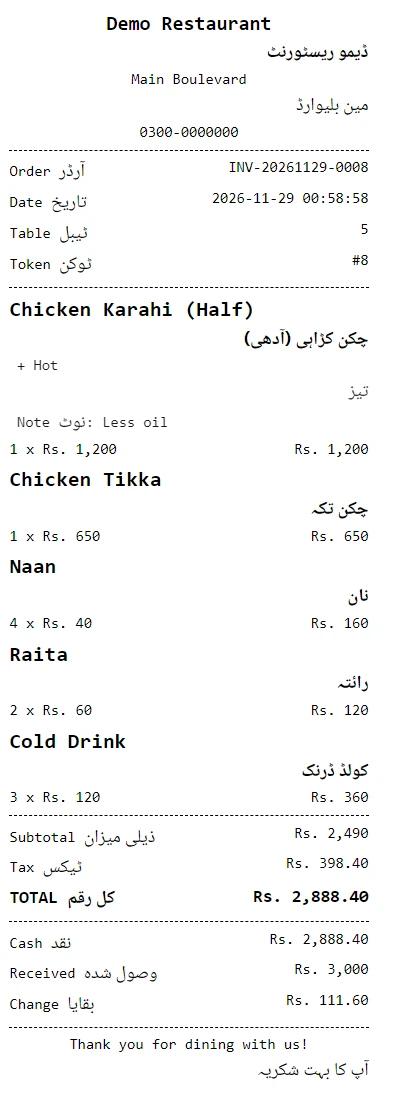
Your menu with Urdu names, printed the way your customers read.
English only, English with Urdu under every line, or Urdu only, for receipts and kitchen tickets separately
A preview of every receipt before it prints, on 58 mm or 80 mm paper
Thermal receipt printers, or any printer through Windows
Your restaurant's name, logo and footer at the top and bottom
Order 07/09 · Recipes and stock
Recipes, ingredients and real food cost
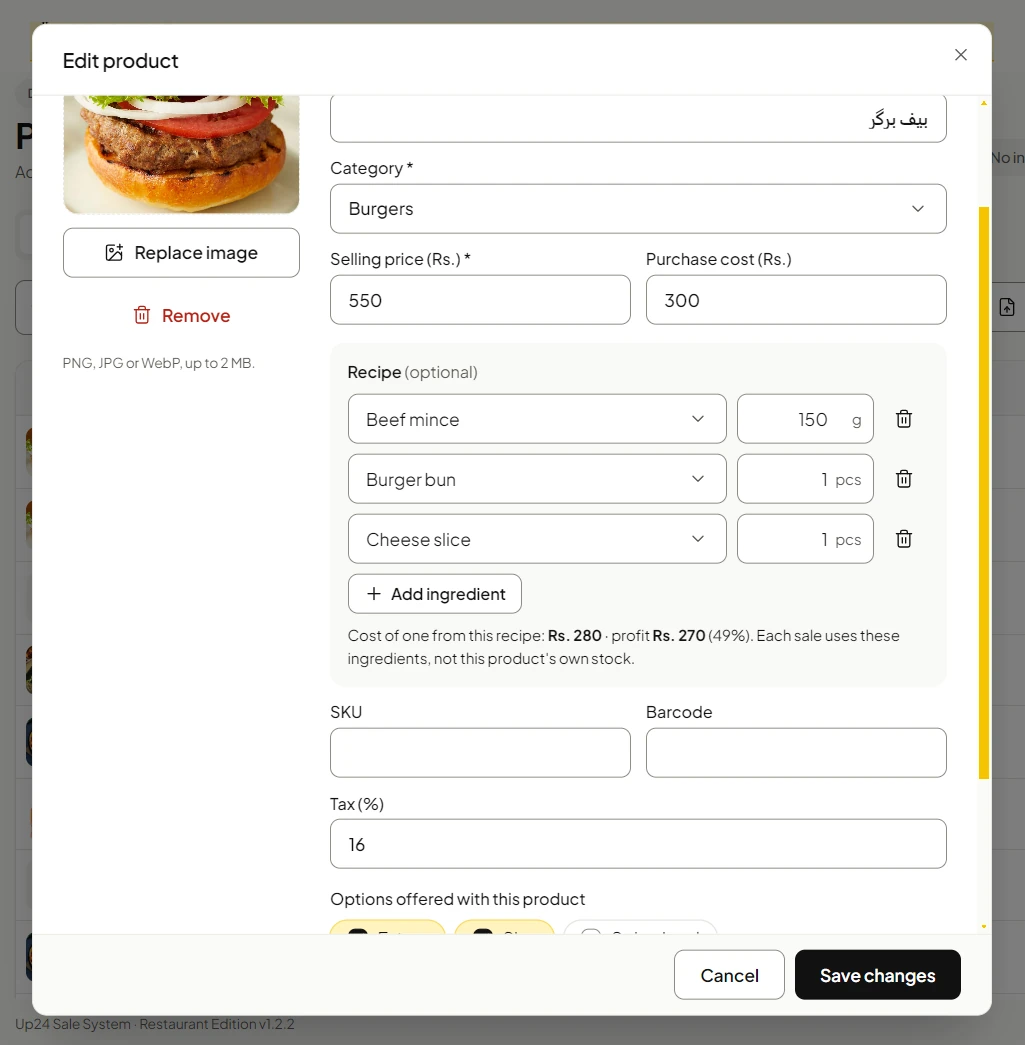
Give a dish a recipe and every sale uses its ingredients.
Ingredients in grams, millilitres or pieces, with a low-stock alert
The recipe cost and profit of every dish
An alert on the dashboard when an ingredient's price rise eats into a dish's margin
Waste: when a cancelled order was already cooked, it is counted as waste, not returned to stock
Order 08/09 · Reports
Know which dishes make you money
Fifteen reports for the owner, each one exportable to Excel.
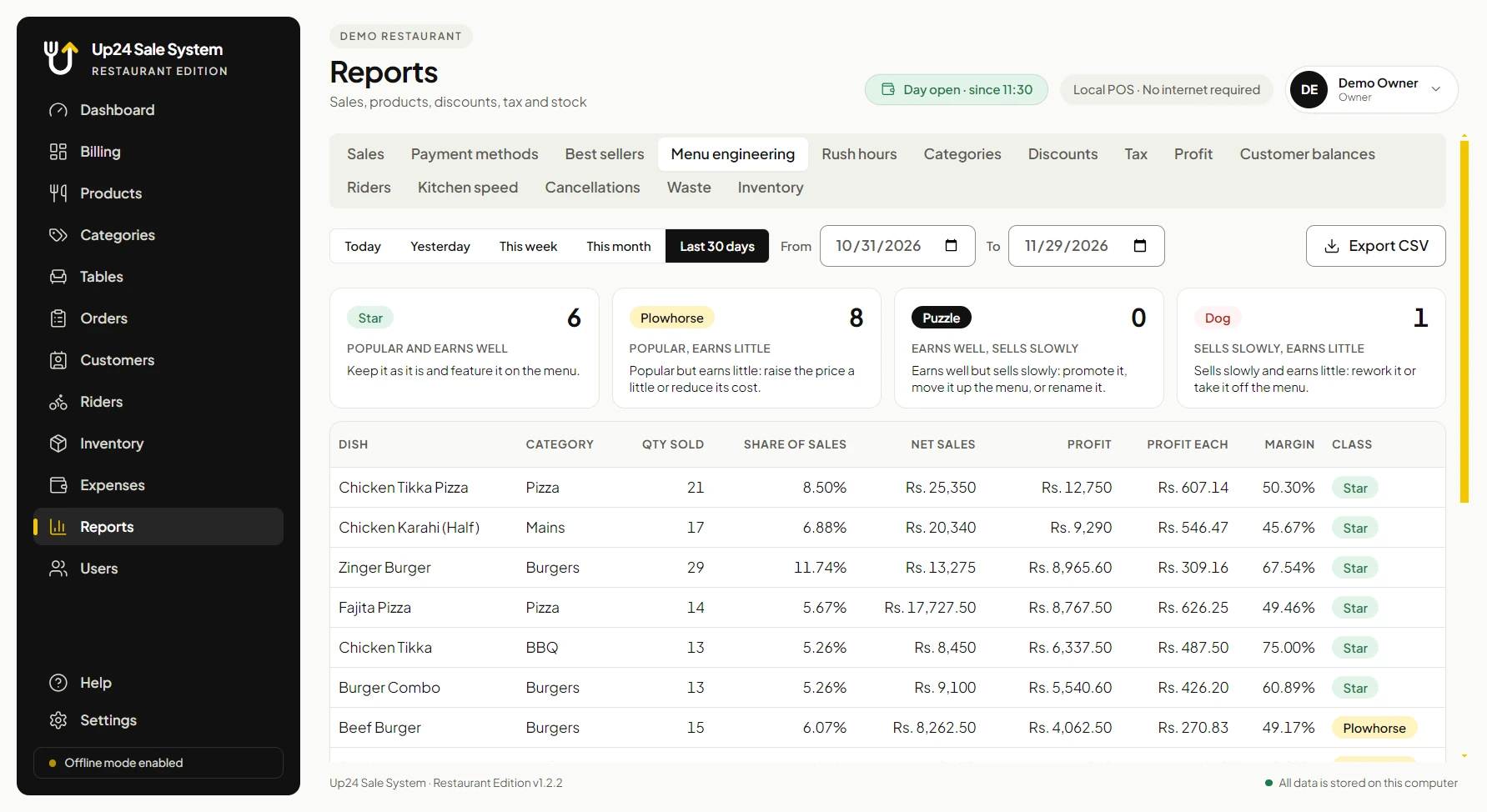
Menu engineering: which dishes are stars, which sell but earn little, which to rework
Rush hours: a weekday-by-hour map of your busy and quiet times
Profit after food cost and expenses, sales by payment method, best sellers, tax
Kitchen speed, cancellations with who asked and who approved, waste, and riders
Order 09/09 · Cash and the day
Open the day, close it, and know if cash is short
The drawer is counted, not guessed.
Open the day with the opening cash and close it with a count
Cashiers count blind: they do not see the expected amount until they enter theirs
Expenses by category, paid from the drawer or not
A day-close report you can print on the receipt printer
Who it's for
From a roadside dhaba to a family restaurant
Small places switch off what they do not need. Bigger places switch it on. It is the same app.
✦ Today's menu ✦
Dhaba and karahi house01
Counter billing with a token, half and full plates as options, and Urdu receipts.
Fast food and burgers02
Deals and combos, a kitchen screen for the grill, and a token display for the queue.
Pizza and delivery03
Delivery by phone number, riders' cash and commission, and pay on delivery.
Family restaurant04
Table bills round by round, a printed bill for the table, and one payment at the end.
Café and bakery05
Fast counter sales, sizes and extras, and a recipe for every item.
Canteen and food court06
Quick billing with keyboard shortcuts, a daily token and a cash count at closing.
How it works
Selling in an afternoon, not a week
01
Download and install
Run the installer on a Windows 10 or 11 PC. It needs no admin rights.
02
Set up the restaurant
Create the owner's PIN, then the setup wizard: name and logo, tax, printers, staff and your menu from Excel.
03
Open the day and sell
Free for 10 days with every feature. Send us your machine code on WhatsApp when you want a licence key.
Pricing
Try it free for 10 days. Pay once you are sure.
One licence key for your restaurant's PC. If the trial ends before you buy, the app becomes read-only: nothing is lost, and a key starts selling again at once.
Yes. Billing, the kitchen screen, tables, reports and backups all work with no internet at all. The data is kept on your own Windows PC. The internet is only used to check for updates and to open WhatsApp.
What does it cost?
It is free for 10 days with every feature. After that you need a licence key. Open Settings, Licence and about, press Send on WhatsApp, and we reply with the price and your key.
What happens after the 10-day trial?
The app becomes read-only: you cannot take new orders, but your orders, reports, exports and backups still work. Enter a licence key and selling starts again at once. Nothing is lost.
Which computer do I need?
A Windows 10 or Windows 11 PC. A touch screen helps but is not needed; a mouse and keyboard work too. The installer needs no admin rights.
Can the kitchen see orders on a screen?
Yes. The kitchen screen shows every order with its items, options and notes, and the cook marks it Preparing and Ready. It can run on a second monitor or TV on the same PC, or on a tablet, phone or smart TV that opens it in a browser over the restaurant's Wi-Fi. No internet is needed for that.
Does it print kitchen tickets?
Yes. Each category can print to its own kitchen printer (grill, pizza, tandoor) or not go to the kitchen at all, like bottled drinks. Tickets can print automatically when an order is placed. A kitchen printer that fails never blocks the sale; you can reprint from Orders.
Can I print receipts in Urdu?
Yes. Give your dishes Urdu names and choose English, Urdu, or both on one receipt. Kitchen tickets have their own language setting. Every receipt shows a preview before it prints, on 58 mm or 80 mm paper.
Does it handle tables and dine-in?
Yes. Open a table, send items to the kitchen in rounds as the guests order more, print the bill for the table, and take the payment once at the end. A table that is still open is not counted as a sale.
How does delivery and rider cash work?
A delivery order takes the customer's phone and address (regular customers are found by phone). It can be paid on delivery. Each rider's cash is tracked, and when they come back you settle them: their commission is taken out, the cash goes into the drawer and any shortage stays on their name.
Can customers pay later (khata)?
Yes. A regular customer can take an order on khata, with a limit you set. They can pay part or all of it later. Their account shows what they owe, how old it is, a printable statement, and a WhatsApp reminder you send yourself.
Can I track ingredients and food cost?
Yes. Add ingredients and give each dish a recipe, and every sale uses its ingredients. You see the cost and profit of each dish, and the dashboard warns you when an ingredient's price rise lowers a dish's margin.
Can I stop staff from cancelling orders?
Cashiers cannot cancel or refund on their own: a manager or the owner enters their PIN and a reason, and it is recorded with both names. The cancellations report lists every one.
Is my data safe?
The app backs up automatically every day and checks every backup. You can add a second folder on a USB stick or another drive, so a disk failure does not take your data with it. Uninstalling or updating the app never deletes your data.
Can I try it with sample data first?
Yes. Settings, Licence and about has a demo: the app restarts into a sample restaurant with a menu, riders and a week of orders. Your real data is not touched, and Exit demo brings you back.
Windows says 'Windows protected your PC'. Is that normal?
Yes. The installer is not code-signed yet, so Windows asks before running it. Click More info, then Run anyway. Updates are checked against our signature before the app offers to install them.
Give your counter and kitchen one system today
Install on Windows 10 or 11 and use it free for 10 days. Want us to show you first? Message us on WhatsApp.